
KUATBOX offers a wide range of fast and secure deposit methods to suit every player's preference. Whether you prefer traditional bank transfers, instant online banking, or modern ewallet payments, KUATBOX has a convenient top-up option for you. All deposit methods are processed securely and credited to your account promptly so you can get back to playing without unnecessary delays.
How to Deposit at KUATBOX – Step-by-Step Guide
Step 1: Log In and Navigate to the Deposit Section
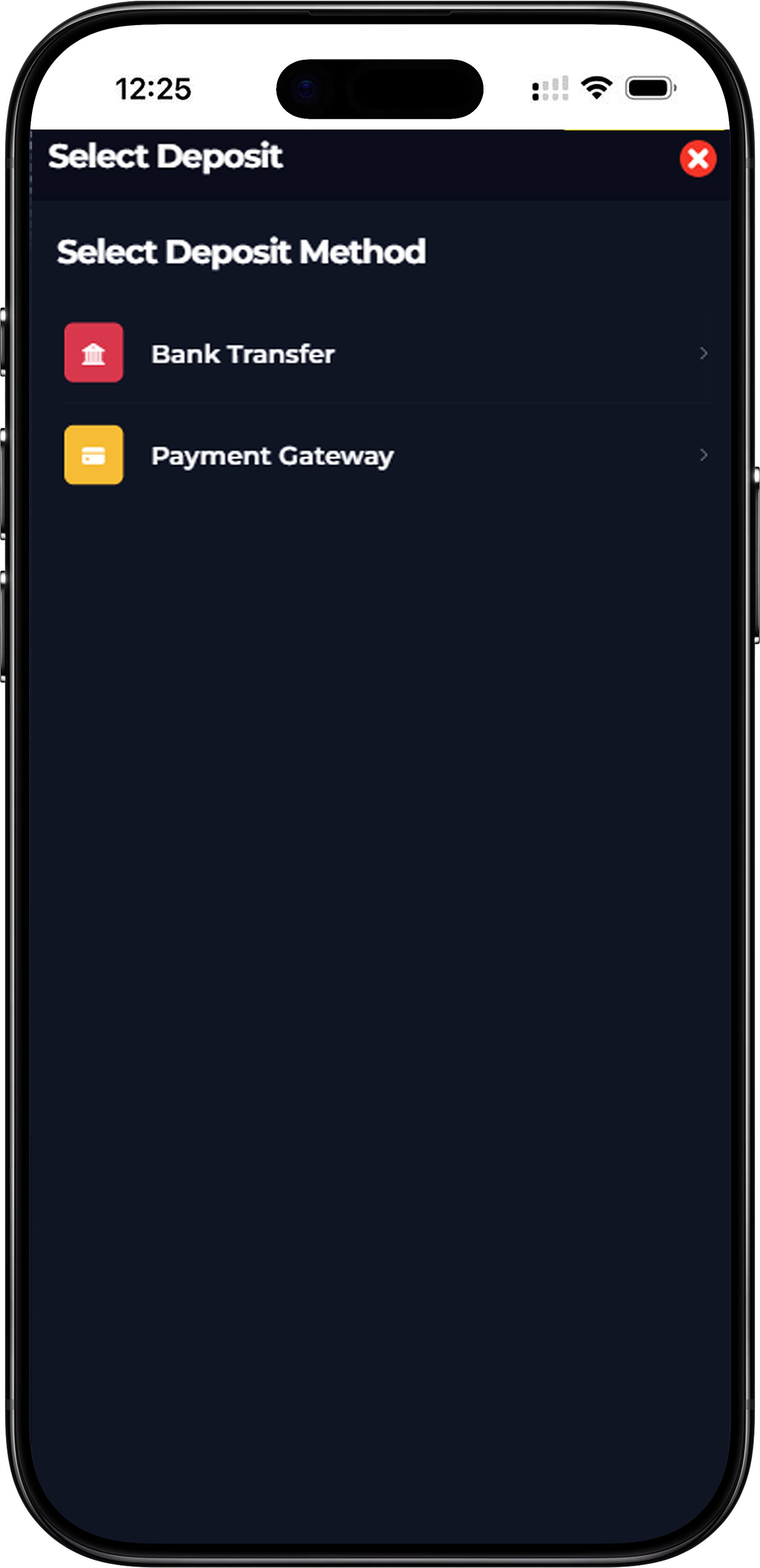
Log in to your KUATBOX account and navigate to the deposit section from your account dashboard. Click on the Deposit button to open the Select Deposit Method screen. You will be presented with two main deposit method options — Bank Transfer and Payment Gateway. Choose the method that is most convenient for you to proceed.
Step 2: Choose Your Preferred Deposit Method
KUATBOX currently supports two primary deposit categories. Bank Transfer allows you to deposit directly from your personal bank account to a designated KUATBOX bank account. Payment Gateway provides a faster automated deposit experience through Online Banking or Ewallet. Select the method that best suits your preference and proceed to the next step.
How to Deposit via Bank Transfer at KUATBOX
Step 1: Select Bank Transfer and Enter Your Deposit Amount
After selecting Bank Transfer on the deposit screen, enter the amount you wish to deposit into your KUATBOX account. Quick-select preset amounts of RM30, RM50, RM100, or RM200 are available for convenience, or you can manually type in your preferred deposit amount.
Step 2: Choose Your Bank
KUATBOX currently supports the following bank accounts for Bank Transfer deposits. Maybank account 569963063503 under Tezza Car Rental. RHB account 25406800025814 under Tezza Car Rental. RHB Bank account 26431700078122 under Nurkaka KMS Enterprise. Select the bank that matches your own bank account to proceed with the transfer. Copy the account number carefully before initiating your transfer.
Step 3: Select Your Payment Method
Under the Payment Method dropdown, select the method you used to complete the bank transfer. The available options are Online Transfer, Cash Deposit Machine and ATM Transfer. Select the option that accurately reflects how you made the deposit to ensure your transaction is processed correctly by the KUATBOX team.
Step 4: Upload Your Bank Slip
After completing your bank transfer, return to the KUATBOX deposit page and click the Upload Bank Slip button. Upload a clear screenshot or photo of your bank transaction receipt as proof of payment. This step is required to allow the KUATBOX team to verify and credit your deposit to your account promptly.
Step 5: Choose a Bonus and Submit
Before submitting, you have the option to select a deposit bonus from the Choose Bonus dropdown. If you do not wish to apply a bonus, select No Bonus with X1 Turnover. Once you have uploaded your bank slip and selected your bonus preference, click the Submit button to complete your deposit request. Your balance will be updated once your deposit is verified.
How to Deposit via Payment Gateway at KUATBOX
Step 1: Select Payment Gateway and Choose Online Banking or Ewallet
From the Select Deposit Method screen, choose Payment Gateway. You will then be presented with two sub-options — Online Banking and Ewallet. Online Banking allows you to deposit directly through your internet banking account via a secure payment page. Ewallet allows you to top up using popular Malaysian digital wallet apps. Select your preferred method to continue.
Step 2: Deposit via Online Banking
If you select Online Banking, enter your deposit amount on the Online Banking screen and select your bonus preference. Click Submit to be redirected to a secure payment page powered by a trusted payment gateway. On the payment page, select your preferred bank from the available options which include Public Bank, CIMB Bank, RHB Bank, AM Bank, Hong Leong Bank, Bank Simpanan Nasional, Alliance Bank, and Affin Bank. Complete the payment through your chosen bank's online banking portal and your KUATBOX balance will be updated automatically upon successful payment.
Step 3: Deposit via Ewallet
If you select Ewallet, you will be redirected to a secure payment page where you can choose from the supported ewallet options. KUATBOX currently supports Touch n Go eWallet, GrabPay, and Boost for ewallet deposits. Select your preferred ewallet, confirm the payment amount, and complete the transaction through your chosen ewallet app. Your KUATBOX account balance will be credited automatically once the ewallet payment is successfully processed.
Supported Banks & Ewallets for KUATBOX Deposits
Supported Banks for Online Banking Deposits
KUATBOX supports online banking deposits from the following Malaysian banks through the Payment Gateway — Public Bank, CIMB Bank, RHB Bank, AM Bank, Hong Leong Bank, Bank Simpanan Nasional, Alliance Bank, and Affin Bank. Additional banks may also be supported through the Bank Transfer method including Maybank and RHB.
Supported Ewallets for KUATBOX Deposits
KUATBOX supports the following Malaysian ewallet services for deposits through the Payment Gateway — Touch n Go eWallet, GrabPay, and Boost. These are three of the most widely used digital wallets in Malaysia, making it easy and convenient for the majority of players to top up their KUATBOX account quickly and securely without needing to use traditional banking methods.
Why Depositing at KUATBOX Is Safe and Convenient
Multiple Payment Options for Every Player
KUATBOX understands that different players have different banking preferences. That is why the platform supports a comprehensive range of deposit methods including manual bank transfers, instant online banking, and popular ewallet apps. Whether you prefer the familiarity of a direct bank transfer or the speed of an ewallet payment, KUATBOX has a deposit option that works for you.
Fast Processing and Instant Balance Updates
Deposits made through the Payment Gateway via Online Banking or Ewallet are typically processed automatically and reflected in your KUATBOX account balance almost instantly. Bank Transfer deposits are processed manually by the KUATBOX team after receipt verification and are usually credited quickly after your bank slip is submitted. For any deposit-related queries, the KUATBOX Live 24h Support team is always on hand to assist.
Secure and Encrypted Deposit Transactions
All deposit transactions at KUATBOX are handled through secure and encrypted payment systems. Your banking and personal financial information is never stored or shared with third parties. KUATBOX is committed to maintaining a safe and trustworthy deposit environment so that every member can top up with complete confidence and peace of mind.
Ready to Top Up? Deposit at KUATBOX Now
Funding your KUATBOX account is fast, simple, and secure. Choose from Bank Transfer, Online Banking, or your favourite Ewallet, enter your deposit amount, and your balance will be ready to use in minutes. Log in to your KUATBOX account now and make your deposit to start playing and claiming your bonuses today.
Deposit into My KUATBOX Account Now